A quick note on AI in music: Before diving into the code, I want to be upfront about my stance on AI in production. Honestly, I am still on the fence about the whole landscape, and it is something I plan to write about more extensively in the future. I do use AI tools like ACE Studio for vocals when I can't get session singers into the lab, or when I just need a shortcut to bring an idea alive quickly.
That said, I fundamentally believe fully AI-generated songs lack soul and originality. I also don't think it is fair to the artists whose life's work has been scraped to train these models. However, as a techie at heart, I wanted to explore AI as a pure creative enabler—something that could actively pull me away from relying on recycled sample packs and standard presets. I wanted a workflow that engineers happy accidents, which led to building this custom tool.
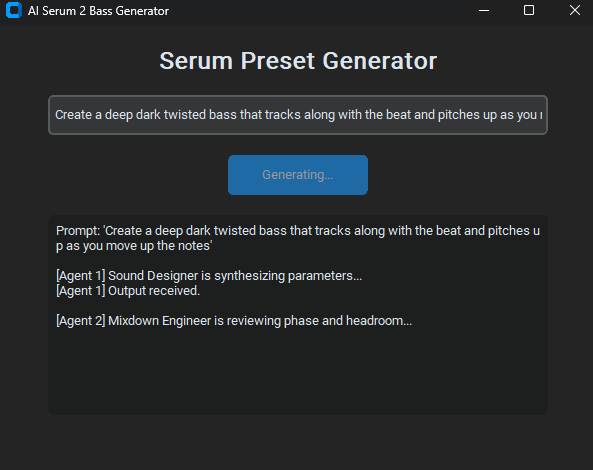
Sound design in drum and bass—especially neurofunk—is a constant battle of chasing frequencies. Building complex, evolving reeses in Xfer Serum 2 often involves hours of meticulous LFO routing, wavetable scanning, and FM matrix assignment inside Ableton Live 12. But what if you could outsource the initial architecture of a patch to an AI agent, and just step in for the final surgical processing?
I recently built a multi-agent workflow using the Google GenAI SDK to do exactly this. By passing complex text prompts into Gemini Pro, I can generate raw JSON data that describes a synth patch, and then run a Python script to compile that JSON into a working .SerumPreset file.
The Tech Stack
To make this work, you need to bridge the gap between large language models and digital audio. The setup relies on a few key components:
- Python 3: The engine handling the logic and file creation.
- Google GenAI SDK (Gemini Pro): The brain generating the parameter values based on my text prompts.
- Xfer Serum 2: The target VST rendering the generated parameters into sound.
How the Script Translates JSON to Audio
Serum 2 preset files are essentially structured data. If you know the parameter IDs (e.g., Osc A Wavetable Position, LFO 1 Rate, Filter Cutoff), you can map JSON keys directly to them. I prompt Gemini to act as a neurofunk sound designer and return a JSON object with aggressive FM routing and heavy LFO modulation.
Here is a simplified look at the Python logic used to parse the AI's response and construct the preset framework:
# Subdivided Audio: Parse AI JSON to Serum 2 Parameters
import json
import struct

def generate_preset_from_ai(ai_json_response):
    # Parse the Gemini Pro output
    patch_data = json.loads(ai_json_response)

    # Define target parameters for Serum 2
    osc_a_wt_pos = patch_data.get("oscA_wt_position", 128)
    lfo1_rate = patch_data.get("lfo1_rate", 0.25)  # 1/4 note
    fm_routing_depth = patch_data.get("fm_from_b_depth", 45)

    print(f"Compiling AI Patch: Neuro {osc_a_wt_pos} | FM Depth: {fm_routing_depth}%")
    # ... Binary compilation logic to write the .SerumPreset file ...
The Resulting Audio
The AI rarely generates a "perfect" mix-ready patch on the first try. Instead, it generates incredibly chaotic, happy accidents. It maps LFOs to parameters I would never think to modulate, creating unpredictable, tearing midrange textures. Once I drop the generated .SerumPreset file into Ableton Live 12, I clean up the transients and lock the sub-bass into mono.
This workflow isn't about replacing the producer; it’s about breaking out of sound design ruts by introducing engineered chaos into the start of the chain.
Subdivided GenAI Neuro Bank
Download 2 raw, AI-generated Serum 2 patches created using this exact Python workflow. Use them as starting points to mangle your own basses.
Download .ZIP